Included New
Live Preview Details
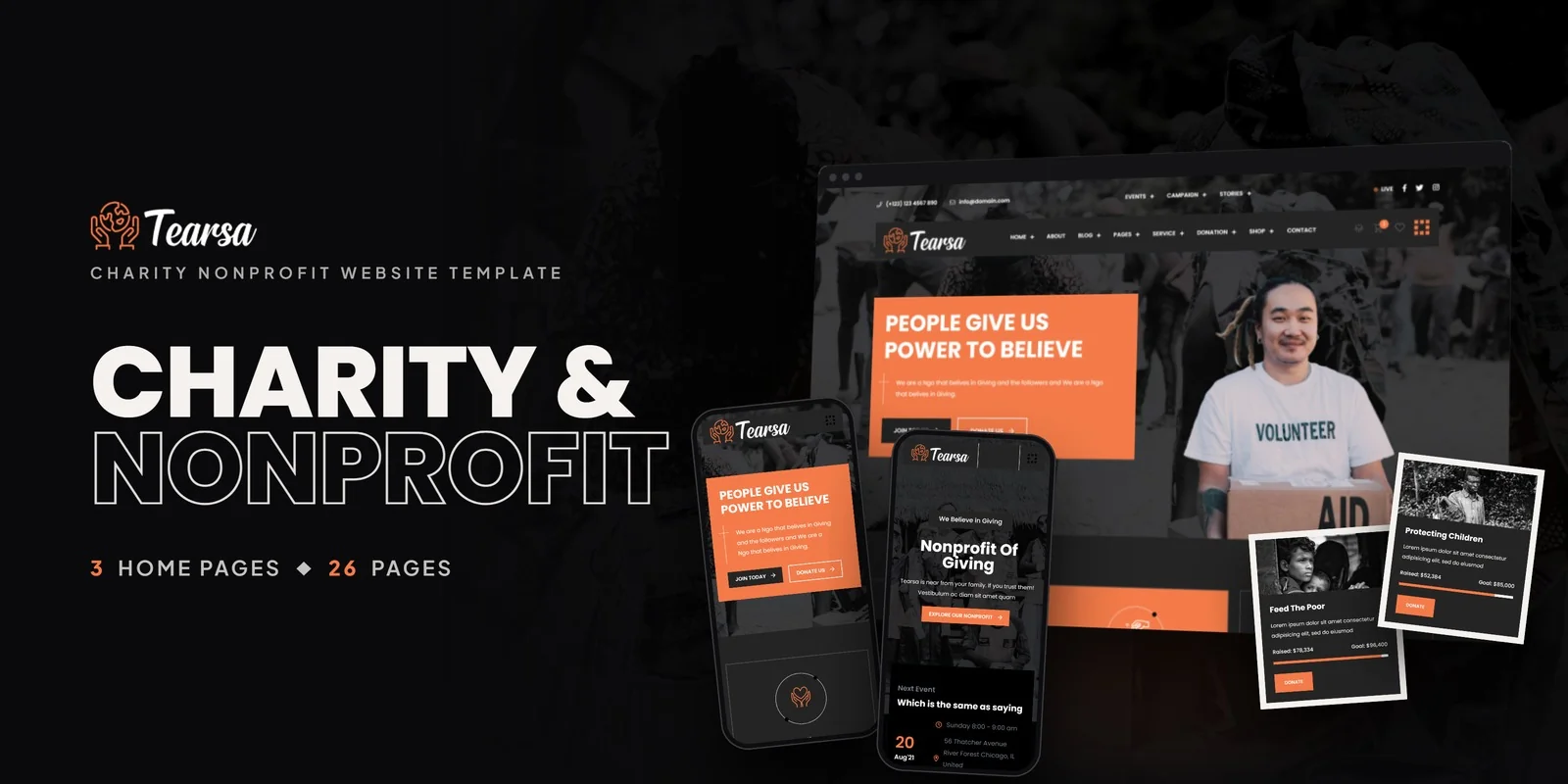
Tearsa — Tailwind CSS Charity Nonprofit Template (HTML)
by MetropolitanHost · updated Nov 1, 2026
Download this template, and every other one, with All-Access.
- Monthlybilled $27 every month$27/mo
- Yearlybilled $117 every year$9.75/mo
- Lifetimeone payment$349
Need only this one? Buy it alone for $18 on MetropolitanHost
- Framework
- Tailwind CSS 4
- Libraries
- Slick, Owl Carousel, WOW.js, Magnific Popup
- Browsers
- Chrome, Firefox, Safari, Edge
- Responsive
- Yes - Mobile First
- Documentation
- Included
- Updates
- Free lifetime updates
- W3C valid
- Yes
- Version
- 11.2.0
About This Item
Charities that want campaigns, donations and volunteer sign-up on one site can start from Tearsa, a Tailwind CSS charity nonprofit template with 26 pages. It is styled with Tailwind CSS 4 and suits charities, NGOs, fundraising platforms and volunteer groups that want a complete site without building each page from scratch.
Tailwind CSS Charity Nonprofit Template Pages for Campaigns, Donations and Volunteers
The core of Tearsa is a set of archive and detail pairs. Each one lists items first, then opens a full page for a single item.
- Campaigns: a Campaign Archive and a Campaign Details page for each fundraising cause.
- Donations: a Donation Archive and a Donation page for individual giving options.
- Volunteers: a Volunteer Archive and a Volunteer Details page for member profiles.
- Stories: a Stories Archive and a Stories Details page for impact reports.
- Events: an Events page and an Event Details page for community gatherings.
A Broadcast page handles live or recorded media. Services come in two styles, so you can pick the layout that matches how you describe your work.
Three Home Layouts, a Shop and a Blog
Three home layouts give you different hero styles and different ways to show campaigns. Pick one as your front page, or compare them before deciding. About Us tells the story of your organisation, and Contact Us holds the form and location.
The shop covers a full merchandise flow, because charities often sell goods to raise funds. It has Shop, Product Single, Cart, Checkout and Wishlist pages. Blog Grid and Blog Details handle news and articles, while an FAQ page answers common questions from donors and volunteers.
How the Interactive Parts Help a Charity
- Countdown timers show how long a campaign has left, so donors see the deadline.
- CounterUp animates impact numbers, for example meals served or funds raised.
- TwentyTwenty compares before and after images, which suits project updates.
- Slick and Owl Carousel rotate featured campaigns and testimonials, so key causes stay in view.
- Jarallax adds parallax backgrounds, and WOW.js reveals sections as visitors scroll.
- Magnific Popup opens photos and media in a lightbox.
The range slider script also supports amount selection where a page needs it. Icons are Flaticon and FontAwesome, while the typography is served by Google Fonts. Because the same Tailwind CSS charity nonprofit template pages share one look, a donor moves from a campaign to a story without noticing a style change.
Compiled Styles and Reusable Sections in Tearsa
With Tailwind CSS 4, the compiled stylesheet holds just the classes your pages call, so leftover rules stay out of the build. That matters on a site with many page types, since each archive and detail page adds its own markup. Styling also lives in the HTML of each section. A campaign card or donation block can move to another page and look the same there.
First Edits for a Charity Site
The home page is the usual first edit. Swap the logo, pick one of the three layouts and rewrite the hero text. Next come the campaign and donation pages, where your own causes, goals and amounts replace the sample content. After that, edit the stories and volunteer pages, then remove the shop if you do not sell merchandise.
You can open the pages in a browser right away. The Tailwind source is included, so you can edit and rebuild the styles when you want new colours or spacing. Preview images stay out of the package, and neutral placeholders replace the preview images. Step-by-step documentation covers setup and customisation, and the layouts work in Chrome, Firefox, Safari, Edge and Opera. Photo credits go to Freepik and Unsplash.
Changelog
v1.0 2026-11-01
- First release with 26 pages and 3 home layouts
- Campaign, donation, volunteer, story and event archive and detail pages
- Shop flow, blog, FAQ and two service styles built with Tailwind CSS 4
More Website Templates
Included
Live Preview Details

Website Templates
Bodhira — Buddhist Temple & Culture HTML5 Template
Formats: HTML5Tailwind CSSReactVue+1
Included
Live Preview Details

Website Templates
Modia – Bootstrap 5 Modeling Agency HTML5 Website Template
Formats: HTML5Tailwind CSSPHPReact+2
Included
Live Preview Details

Website Templates
Looker – Bootstrap 5 Cosmetics Store HTML5 Website Template
Formats: HTML5Tailwind CSSPHPReact+2